Work from anywhere.
Either creator can direct research, scene planning, code and reviews through connected cloud tools. PC1 can stay offline.

Immortal Legend Studios × QuikyCode / Studio Systems
Dots, subagents and connected tools for Legend and Quik. Choose the work, run it in the right place, and bring back a result the team can use.
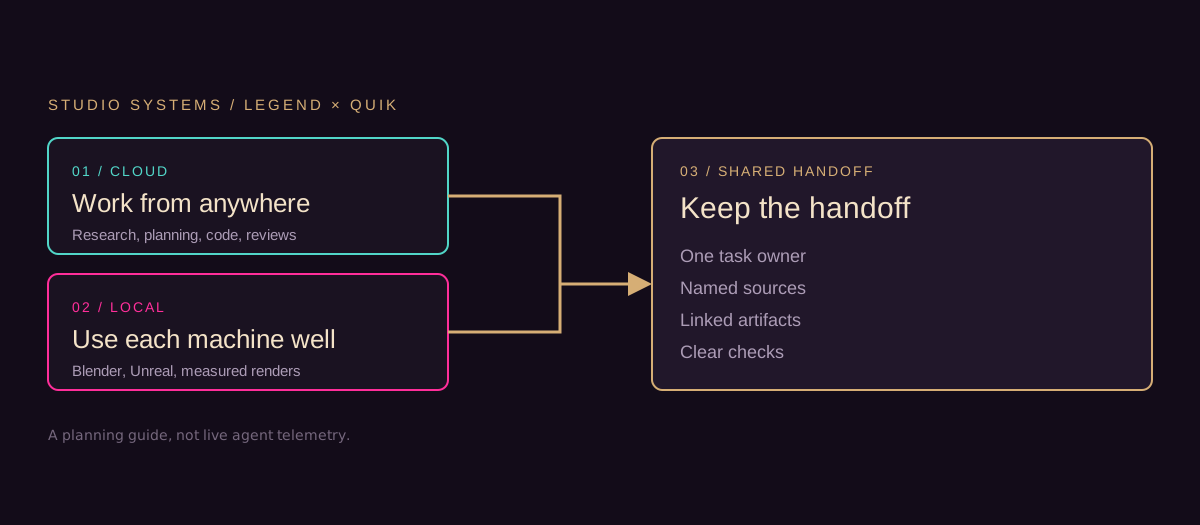
Either creator can direct research, scene planning, code and reviews through connected cloud tools. PC1 can stay offline.
Blender, Unreal, measured camera renders and engine tests run on a ready, explicitly connected workstation or configured compute.
One task owner, named sources, linked artifacts and clear checks. Both creators contribute across creative and technical work.
This is a dated operating guide, not live agent telemetry. Publishing it does not start a job or connect either creator’s desktop. Quik’s construction pause and the current foundation/protocol requirements remain in force.
Pick the next job
Open the part you need. Keep the sources and the approval status with every result.
| Lane | Useful work | What must be ready |
|---|---|---|
| Cloud / start now | Search accessible project sources, recover prompts, compare asset lists, plan scenes, draft code and prepare reviews. Either creator can direct this from a browser. | The selected agent needs the actual sources and its own service permissions. No local GPU is needed for cloud work. |
| Cloud / add for a job | Repeatable image workflows, remote rendering, builds and longer jobs. | A configured service, a successful sample, usage limits and an output destination. No Comfy or render farm connection is established by this guide. |
| Local / each workstation | Blender modeling and camera renders; Unreal asset import, collision, gameplay and performance checks; suitable local-model experiments. | A stable machine, installed tools, project access and a small execution test. Legend's PC1 is under diagnosis; Quik's readiness is not established here. |
| Shared / every handoff | Source revisions, task ownership, artifacts, checks and decisions. | One repo record and linked outputs. Private agent memory is not the team database. |
The work laptop can direct cloud tasks and review results while PC1 is unavailable. It does not need Blender, Unreal or a local LLM installed for that role. Software installation and computer control apply to the explicitly connected target; access here does not provide access to either creator's desktop.
Both creators can write, design, model, code, test and review. The useful starting responsibilities are Legend for creative intent, canon and visual acceptance, and Quik for engine integration evidence. These are shared working responsibilities, not exclusive skill boundaries.
Subagents are useful for independent, scoped work: an archive researcher, a prompt curator, a builder, and a separate reviewer. Parallel work helps when each job has clear inputs and its own output. Shared files and one coordinator keep their results aligned.
A coding/testing loop should stop at a defined result, retry count, time limit or blocker. Do not describe session subagents as an endlessly running studio. Unattended work needs a configured runner or scheduler, persistent task state, usage limits and a tested completion path.
Useful future automations include a weekly source-change digest, missing-preview reports and asset-register checks. They are proposals; this release creates no schedule or background job. Service/API subscriptions and local compute costs depend on the chosen route and need a per-job limit.
Yes: either creator's agent can find accessible scene text, search the prompt archive, match existing art and plan new images. Begin with the repo's story/ and art/midjourney/ records; they are a starting archive, not proof of a complete Midjourney account export.
Midjourney supports personal-history searches and copying job/prompt information. Use an authorized export/intake route for account material. Its published rules prohibit unauthorized automation; do not presume a general API or scrape the account. An image download is not proof that its original prompt was included. When only pixels remain, label any inferred prompt reconstructed.
Proposed first pilot: one scene, six storyboard frames and two polished images. Legend brings scene intent and references; Quik adds useful environment, prop and camera coverage. Review the contact sheet before expanding. No images are commissioned by publication of this plan.
Use the adopted Spatial Imagery workflow for views that must describe the same physical place. Establish a reviewed layout, shared 3D model and saved cameras; render those views, optionally finish them with controlled image generation, then compare against the geometry.
For Crown Key, a waterfront view must use the actual reviewed building placement and camera direction to establish what appears beyond the windows. A visually convincing generated view alone cannot establish the building's distance from water or its metric scale.
Freeform imagery remains useful for exploration, style and mood. Geometry supplies spatial constraints; image finishing supplies appearance. Record the source, layout/model/camera revisions, method, differences and approval scope. Comfy workflows are a candidate way to automate a repeatable finishing process after a sample connection succeeds.
Download the task template and fill in a task ID, owner, reviewer, goal, exact source revisions, execution target, dependencies, allowed changes, output paths, acceptance checks and stop limits. For creative work include canon/visual status; for code include branch and tests; for engine work include project/world and binary-file ownership.
Start with one small test for each new connection: read a named source, produce a disposable output, retrieve it and record the evidence. Move a tool from planned to verified only after that test succeeds. Each creator connects their own account and workstation as needed.
Studio Systems is the umbrella for dots, subagents, plugins, computer control, creative pipelines, local models and future services. Add tools to the versioned register with a category, purpose, execution location, status evidence, owner/setup requirement and next useful test.
Edit the repo sources and run python tools/build_production_desk.py. Keep generated source/deployed pages together; update this release and its date when capabilities change. The website displays a snapshot, not live agent telemetry or a shared task backend. Secrets and unrelated private content stay outside the publication inputs.
References checked 16 October 2026. The register's connection evidence is separate from a vendor's advertised capabilities.
Dated project-planning snapshot. Session tools, creator reports, adopted methods and configured services have different evidence. Access does not transfer between accounts.
12 tools and workflows
All records remain readable without JavaScript. Open a tool for its evidence, setup and next useful test.
Use: Coordinate scoped tasks, search connected sources and package handoffs.
Evidence: Legend reports a ready dot; Quik’s setup and desktop execution are unverified.
Setup: Each creator uses their own account and explicitly connected environment.
Next test: Have each dot read a named project source and return one linked artifact.
Use: Split archive research, building and independent review into bounded jobs.
Evidence: Delegation tools are exposed in this session; no project subagent job is running.
Setup: A coordinator supplies source revisions, separate outputs and a stopping rule.
Next test: Research and review one scene packet with independent acceptance checks.
Use: Share guides, task records, branches, PRs and evidence.
Evidence: This session read 215GrandAve/lost-souls through the connected repository tool.
Setup: Permissions are account-specific; follow repository instructions and checks.
Next test: Publish this guide through a checked branch/PR and record its deployed commit.
Use: Publish the generated production guide and verify the served result.
Evidence: The repo records main-branch Workers Builds for both production sites; this release must check its own deployment.
Setup: Existing repository deployment configuration; inspect build state after merge.
Next test: Confirm this release’s Worker build and the live Studio Systems route.
Use: Create storyboard frames, scene images and reference-based edits.
Evidence: An image generation/editing tool is exposed in this session; no storyboard generation has been started.
Setup: Provide scene text, identity/wardrobe/environment references and output scope.
Next test: Produce a small reviewed pilot before chapter-wide generation.
Use: Combine layout, geometry, cameras, finishing and overlay review for consistent views.
Evidence: PI-WF-SPATIAL-IMAGERY R01 is adopted in current decisions and the protocol pointer.
Setup: A selected layout/model, measured frame, cameras and comparison criteria.
Next test: Render one Crown Key camera and compare it to its named source/layout.
Use: Find original prompts and match existing art to scene requirements.
Evidence: The repo names art/midjourney prompt records; a full account archive connection is not verified.
Setup: Search supplied/repo records; use an authorized account/export route for missing material.
Next test: Recover one original image/prompt/job record and flag all missing fields.
Use: Run a reusable, versioned image-finishing workflow.
Evidence: Vendor documentation describes agent connections; no project connection or sample run is verified.
Setup: Choose local or cloud hosting, configure access and check usage limits.
Next test: Run one disposable workflow and retrieve its output and workflow revision.
Use: Operate supported web interfaces or a separately connected desktop where available.
Evidence: A cloud browser surface is available here; native desktop control is disabled in this workspace. Neither creator’s desktop is verified here.
Setup: Use the tool supported by the selected environment and target account.
Next test: Complete one small read/output task on the explicitly selected target.
Use: Author models and cameras; inspect assets and validate imports, collision and performance.
Evidence: Project work exists; this release does not verify either workstation’s current execution readiness.
Setup: Stable hardware, installed versions, repo/LFS access, project and file ownership.
Next test: Open the named project and record one measurable import/render test.
Use: Explore private indexing and bounded drafting/coding tasks where hardware is suitable.
Evidence: No local-model runtime, model download or performance result is verified here.
Setup: Choose a model/runtime after hardware recovery; benchmark memory, speed and output quality.
Next test: Use one small task with a measured completion time and quality check.
Use: Run recurring source digests, checks or bounded background jobs.
Evidence: Scheduling tools are available in this workspace; no Studio Systems schedule or runner was created.
Setup: Persistent inputs/outputs, service permissions, completion reporting and usage limits.
Next test: Pilot one job with a visible result before making it recurring.
No matching tools. Clear the filters to restore every record.
Give the work an owner and reviewer, identify the exact inputs, choose cloud or local execution, and define what a useful result looks like. The downloadable template is editable; this page does not submit a job.